
Best Nonprofit Grant Management Spreadsheet: How to Choose
Key takeaways
- Grant management is at least six separate jobs; decide which one is costing you time this quarter before you compare a single template.
- Four questions reveal how a template was built: does eligibility act as a gate, are stage and probability separate columns, can a budget line be traced to an activity, and does an unscored criterion stay blank instead of counting as zero.
- A spreadsheet is the wrong tool once you need audit logs, row-level permissions, or records about named individuals; knowing where that line sits is part of choosing.
In this guide 9 sections
- The six jobs people call grant management
- Test one: does eligibility act as a gate?
- Test two: are stage and probability separate columns?
- Test three: can a budget line be traced back to an activity?
- Test four: what happens to an unscored criterion?
- The award is where most trackers stop
- When a spreadsheet is the wrong tool
- Tools that help
- Where to start
Search for a grant management spreadsheet and the first page of results promises the same thing in slightly different words: one file that carries a grant from first contact to final report. Open a few and the differences show up fast. One is a prospect list with a status column. One is a budget workbook. One is a donation tracker with the word grant in the header. Each is described as complete.
None of them is wrong. They are built for different parts of the grant cycle, and which one fits depends on where your work currently breaks. This guide sets out the six jobs that get called grant management, four tests you can run on any template before you commit, and the point at which a spreadsheet stops being the right tool at all.
The six jobs people call grant management
A file that does one of these well and offers the rest as empty columns is not a worse product. It is a different one.
| Job | What it decides | What it looks like |
|---|---|---|
| Prospect screening | Which funders are worth writing for | A research sheet with an eligibility gate |
| Pipeline forecast | What the board should expect to receive | A tracker with stage and probability |
| Proposal review | Whether a draft is ready to submit | A scorecard with mandatory checks |
| Budget build and check | Whether the budget survives a reviewer | A costing workbook with integrity checks |
| Restricted fund tracking | How much of each award is actually left | A register tagged by fund |
| Reporting and closeout | What is due, when, and to whom | Deadlines with owners and a warning window |
Write down which of those is costing you time this quarter before you compare templates. Teams that skip that step buy the file that photographs best and end up using one tab of it.
Test one: does eligibility act as a gate?
Open the screening sheet and look at how eligibility is handled. If it sits inside the scoring block as one weighted criterion among five, a warm relationship with a program officer can outweigh a failed eligibility test, and the file will keep recommending bids your organisation cannot win. Eligibility belongs before the score, as a pass or fail that removes an opportunity from the writing queue.
The second half of the same test is capacity. A shortlist is only realistic if someone has estimated the bid hours for each opportunity and compared the total with the writing hours the team actually has. Ask whether the template has an hours column at all.
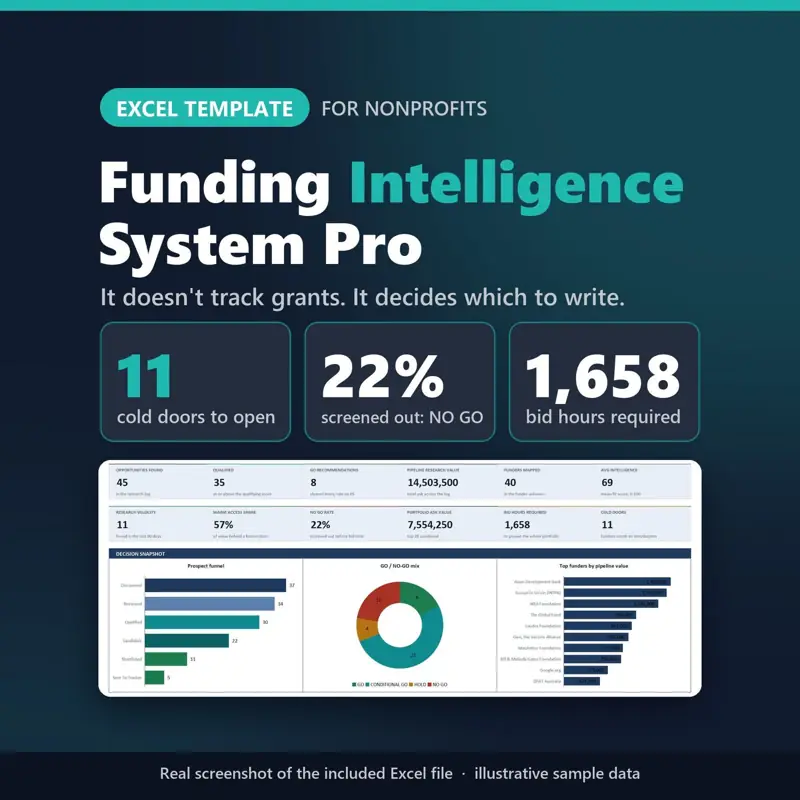
In the sample file of the Funder Prospect Research System, 45 opportunities are logged across 40 funders. Scoring returns 8 GO, 23 CONDITIONAL GO, 4 HOLD and 10 NO GO, so 22% are screened out before any bid time is spent. The top 20 that survive still need 1,658 hours against a capacity of 600. Those are illustrative figures, but the shape is the useful part: screening removes a fifth of the list, and what remains is still longer than the team can write. A template that cannot show you that gap is not helping you choose.
Test two: are stage and probability separate columns?
Many trackers carry a single status column that doubles as a forecast. Once submitted is assumed to mean a fixed chance of funding, two different judgements get welded together: where the application has reached, and how likely it is to be funded. A renewal with a funder who has paid you for three years and a cold application to a national foundation can sit at the same stage and deserve very different numbers.
The fix is two columns. Stage records a fact. Probability records a judgement, is written down with its reason, and is revisited after every decision comes back. The forecast then becomes arithmetic rather than hope: multiply each open request by its chance of being funded, add the results, and show a conservative and an optimistic scenario beside the expected one.
Grant Tracker Pro scores each opportunity 0 to 25 on strategic, geographic, eligibility and capacity fit for a priority out of 100, where 85 and above reads Pursue Immediately. You can type your own win probability or let the pipeline stage supply one, and the forecast runs in three scenarios across eight quarters. In its sample data a pipeline of 3,766,175 becomes an expected 1,358,909. A gap that wide between the headline and the weighted figure is the reason the weighted figure belongs in board papers.
Test three: can a budget line be traced back to an activity?
Budget errors rarely look wrong in a finished spreadsheet. The requested amount does not match the budget total. Indirect costs are applied to a base that already contains shared costs charged as direct lines, so those costs are counted twice. A unit rate appears that nobody can source.
Open the budget tab and pick one line at random. It should answer three questions without anyone opening another file: which activity does it pay for, what assumption sets the amount, and where did that number come from. For indirect costs, the rate, its source, and exactly which categories sit in the base should all be visible.
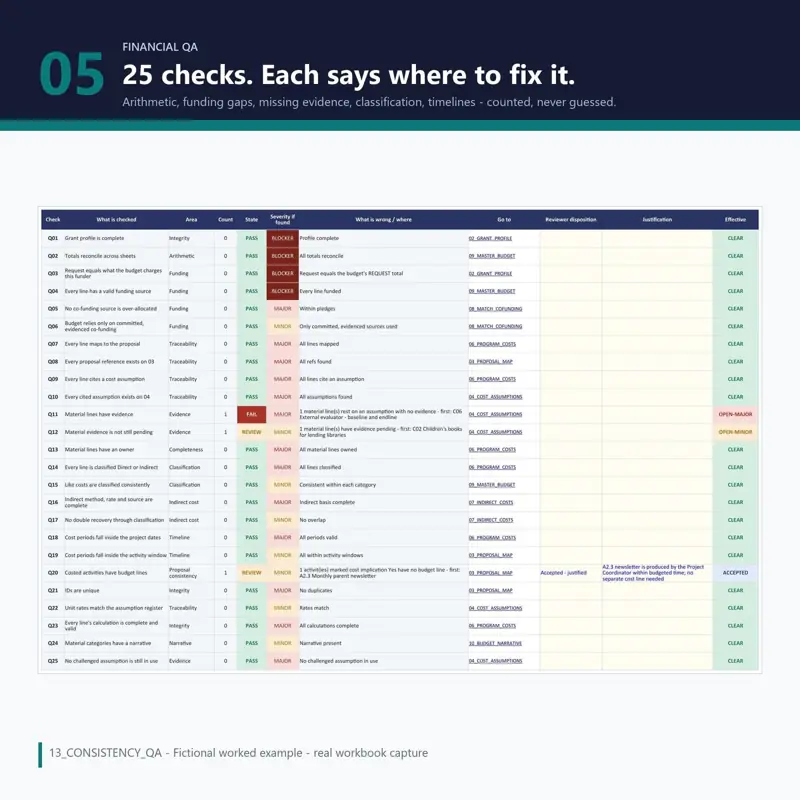
The Grant Budget Template applies that test line by line and runs 25 integrity checks that say what is wrong and where. In its fictional worked example, indirect cost is 10% of a 236,756 base, 22 of 25 checks pass, and the release decision is REVISE with the reasons listed. Three specific problems found before a funder finds them is what a check is for.
Test four: what happens to an unscored criterion?
This one is small and tells you a great deal about how carefully a template was built. In a review sheet, a criterion nobody has scored yet should stay blank. If the file counts it as zero, the average drops, the draft looks weaker than it is, and genuine weaknesses elsewhere hide behind a number that is mostly an artefact of missing data.
The related question is whether the file is allowed to refuse. An average across criteria cannot say whether a proposal is ready, because some requirements are pass or fail: eligibility, mandatory attachments, a safeguarding policy for work with children. The Grant Proposal Scoring Matrix sorts the funder rules into mandatory, scored and informational, checks the mandatory ones first, and returns DO NOT SUBMIT on any confirmed mandatory failure whatever the score. In its worked example a draft scores 76.7 out of 100, inside the MINOR REVISION band, and still reads HOLD because eight issues are unresolved.
The award is where most trackers stop
A pipeline tracker usually treats an award as the finish line, which is why restricted money so often disappears into the general bank balance the week it arrives. Two habits keep it visible: tag every transaction with a fund, and record what a funder has actually paid separately from what they awarded.
The fictional pantry in the Nonprofit Treasurer Spreadsheet example shows the difference. The board sees a book balance of 20,232. Split by fund, the Youth Mentoring Grant has received 6,000 of a 12,000 award and spent 3,200, leaving 2,800 restricted; the Food Access Grant has 1,700 left of 8,000 received; and 10,000 is designated as a board reserve. The funds add up to the book balance, which is the check worth insisting on. Reporting deadlines belong in the same file with a warning window, 30 days being a sensible default, so reports are drafted from current figures rather than reconstructed.
When a spreadsheet is the wrong tool
Spreadsheets suit grant work because grants are a small number of large records that one or two people maintain. They stop suiting it when any of three things becomes true: you need to know who changed a figure and when, different people must see different rows, or the records describe named individuals in situations where a leaked file causes harm.
Scholarship applicants, service users, and anyone in a safeguarding, immigration or legal-evidence context fall on the far side of that line. The Client Case Management System is unusual in shipping a suitability check that says when a spreadsheet is the wrong tool for the records you are keeping, along with a migration workbook for planning the move. Most templates will not volunteer that, so make the judgement yourself before you start entering data.
The milder version of the same limit is size. A tracker holding a few hundred opportunities is comfortable. One holding several thousand rows with ten people editing it is a database waiting to be written, and the warning signs are familiar: a filter left on, a formula overwritten by a paste, two copies of the file in circulation.
Tools that help
- Funder Prospect Research System: scores each opportunity out of 100 and applies seven rules in order to return GO, CONDITIONAL GO, HOLD or NO GO with a reason and a next action.
- Grant Tracker Pro: scores opportunities for a 0 to 100 priority and forecasts the pipeline in three scenarios across eight quarters.
- Grant Budget Template: traces every line to an activity and an assumption, runs 25 integrity checks and reconciles the request with the budget.
- Grant Proposal Scoring Matrix: checks mandatory items before scoring, supports up to 8 reviewers with variance flags, and returns DO NOT SUBMIT on any confirmed mandatory failure.
- Nonprofit Treasurer Spreadsheet: tracks restricted funds against the reconciled book balance and links money received to actual deposits.
- Client Case Management System: ships a suitability check that says when a spreadsheet is the wrong place for a record, and a migration workbook for the move.
Where to start
Pick the job that is costing you time, not the file with the most tabs. If bids keep going to funders you cannot win, start with screening. If the board hears a pipeline total that never arrives, start with the weighted forecast. If reviewers find budget errors you should have caught, start with the budget checks. And if the money is already awarded and nobody can say how much of it is left, the tracker is not the problem at all, the fund tagging is. Grant management for small nonprofits walks the whole cycle in order if you would rather fix the sequence than one tab.
Keep reading
All guidesGrant Management for Small Nonprofits: A Practical Guide
GrantsHow small nonprofit teams screen funders, forecast a grant pipeline honestly, build and review proposals, check budgets, and track restricted awards.
Grant Tracking Spreadsheet: The Columns That Matter
GrantsHow to build a grant tracking spreadsheet that survives a board meeting: the grain, the columns that earn their place, and the weekly review by exception.